UE_Angelscript 绑定篇——解决方案:Unreal Interfaces 缺失的缓解药剂#
问题来源#
一句话:Hazelight 官方不支持。 Hazelight 在自己的项目中禁用了 UE 接口相关的一切功能,他们更喜欢在项目里使用 Actor + Component 的组合方式,对 Actor 和 ActorComponent 的支持就比较完善。
这种缺失会造成一个问题,如果有模块大量使用了 UE 接口功能,那么调用起来就是头疼的事了。如何解决这个头疼问题,除了修改脚本源码外,这里提供一些缓解疼痛的方案。
注:除了本文提到的以下方法外,调用的函数可以考虑手工绑定,也是一种选择,不过就复杂更多了,本文不做详细探讨。
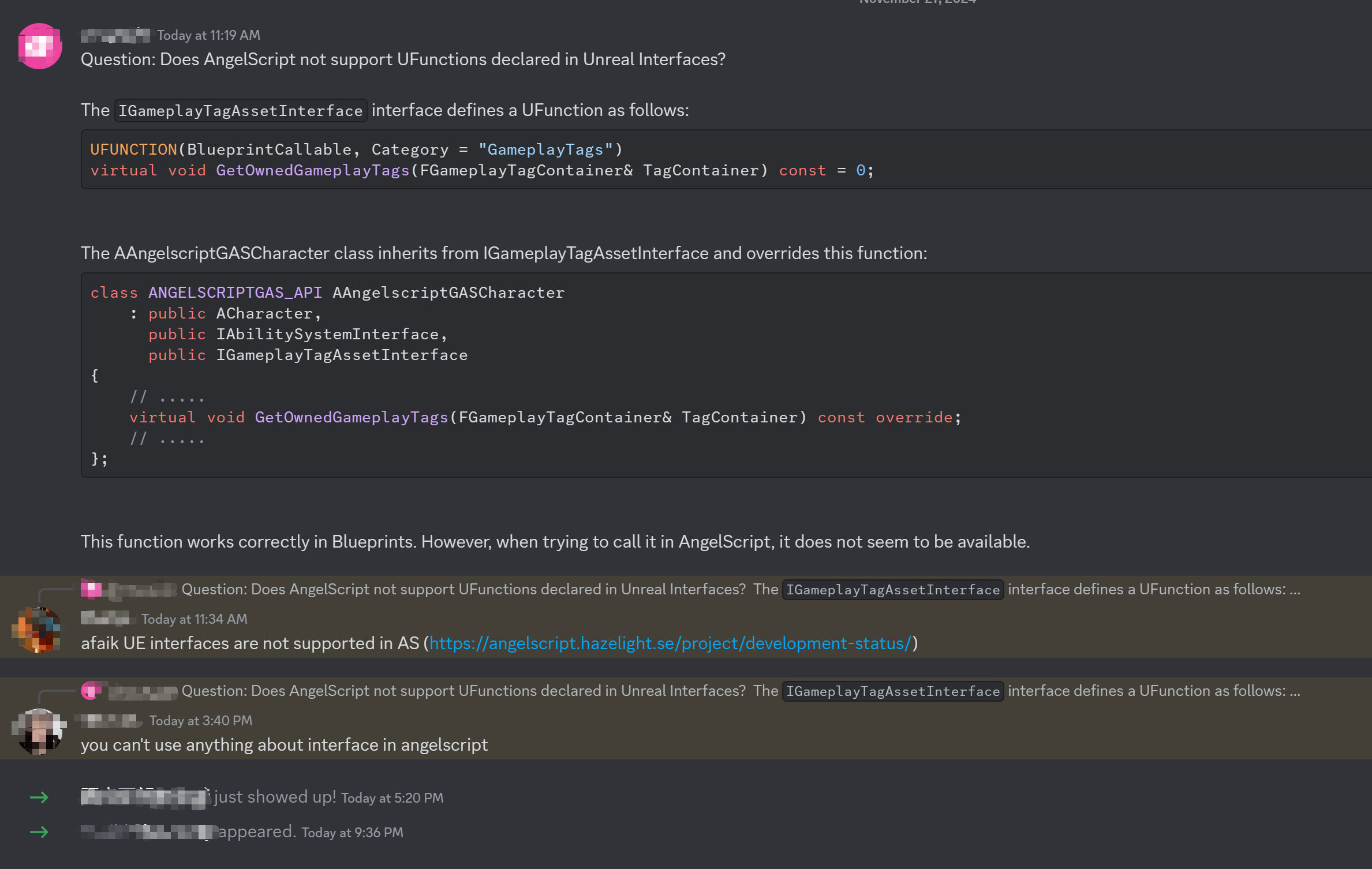
Unreal Interfaces 的函数调用#
一句话: cpp 里用 Mixin 包装。
如果想要调用 Unreal Interface 的 BlueprintCallable 函数,那么需要包装,一般这种函数是 public 的,可以在 cpp 里用 Mixin 的方式进行包装。
函数名之前建议加上 BP_,其会在绑定到 AS 的时候自动去掉,使用起来和直接调用接口函数就一致了。不过我个人喜欢给这些函数加个后缀,提醒这是来自于 Unreal Interface ,要小心点的意思。
Unreal Interface 的包装函数,最好用 ScriptCallable ,不然蓝图里就可能有两个同样的函数了。
另外,如果不麻烦,顺便就将其他未标 BlueprintCallable 的函数也包装了吧,免得以后用还得来绑定。
有人提供方案,继承接口的时候再次标上 UFUNCTION 的标识符?也不是不行,都继承了,怎么处理都方便。
Unreal Interfaces 的函数覆写#
Unreal Interface 的 vitual 函数#
一句话: 继承下来,然后暴露出一个 BP\_版本专门给 Angelscript 使用。
其他任何想暴露给 Angelscript 覆写的函数,也是这个办法。有时候也可以暴露出一个动态单播或多播委托,这样也可以处理很多问题,甚至更方便一些。
Unreal Interfaces 的 BlueprintNativeEvent 或 BlueprintImplementableEvent#
BlueprintNativeEvent 的话,这有点类似 vitual 函数的处理方式,但是更麻烦一点。
BlueprintNativeEvent 很多时候会同时带有 BlueprintCallable,这时候参照 BlueprintCallable 的方式,Mixin 绑定。至于覆写这个函数,需要在实现里,暴露出一个 BP\_版本专门给 Angelscript 使用。
BlueprintImplementableEvent 的话,暂时没办法找到覆盖的办法。或许继承的类里,直接写个同名的函数覆盖?这种情况少见,忽略吧。
一个接口里一般不会有太多这种东西,可能因为以下内容导致一些标识符问题:BlueprintCallable 不带 BlueprintEvent 的函数,和 BlueprintCallable + BlueprintEvent 的函数,不能同时存在一个 Interface 里。因为 BlueprintCallable 不带 BlueprintEvent 的函数会要 UClass 里带上 NotBlueprintable,而 BlueprintEvent 需要 Blueprintable 或空着不写。
判断某个类是否实现了 Unreal Interface 的解决方案#
尽管可以实现判断 Class 是否实现了 Unreal Interface 的方法,但是没办法通过 Unreal Interface 的指针来调用某 Object 的接口方法,这没办法,接口在这里真的不受待见。
有时候我们还是希望知道一个类是否实现了某个接口,有几个方式。
1、最简单的就是查看类的继承关系。
2、通过 cpp 写一个有 Cast 代码的函数,然后给脚本调用。
3、通过反射,不过写起来复杂一些,性能也未必好。
以下是通过反射写的,可以参考。
用 cpp 包装一个专用的类,比如叫做 UInterfaceAddonLibrary,继承自 UBlueprintFunctionLibrary,写两个函数分别判断 UClass 和 UObject 是否实现了 Unreal Interface。
同时,通过 UObjectMixinLibrary 给 UObejct 注入一个 BP_HasInterface 函数,方便调用。
这是其中一种通过反射查询 Unreal Interface 的方法,比较简单,不过因为遍历了 ANY_PACKAGE ,可能性能一般。是可以有优化版本的,实现起来逻辑复杂一些,如果有需求,可以专门写来调试。
// ~~ InterfaceAddonLibrary.h
#pragma once

#include "Kismet/BlueprintFunctionLibrary.h"

#include "InterfaceAddonLibrary.generated.h"

UCLASS(MinimalAPI)
class UInterfaceAddonLibrary : public UBlueprintFunctionLibrary
{
    GENERATED_UCLASS_BODY()

public:
    /** Check if an UClass has Implemented an Unreal Interface by pass in an FName.
     * Example usage in Angelscript:
     * \code
     * Class ExampleActor : public AActor, public IExampleInterface
     * InterfaceAddon::HasInterface_UClass(ExampleActor::StaticClass(),n"ExampleInterface");
     * // Make the ExampleActor as ExampleActorObject
     * InterfaceAddon::HasInterface_UClass(ExampleActorObject.Class,n"ExampleInterface");
     * \endcode
     **/
    UFUNCTION(BlueprintCallable)
    static bool HasInterface_UClass(UClass* ObjectClass, const FName& InterfaceName)
    {
       if (!ObjectClass || InterfaceName.IsNone())
       {
          UE_LOG(LogTemp, Warning, TEXT("Invalid input: ObjectClass or InterfaceName is null."));
          return false;
       }

       // Use FName to search the Interface class  (maybe it is not an Interface)
       const UClass* InterfaceClass = FindObject<UClass>(ANY_PACKAGE, *InterfaceName.ToString());
       if (!InterfaceClass)
       {
          UE_LOG(LogTemp, Warning, TEXT("Interface %s not found."), *InterfaceName.ToString());
          return false;
       }

       // Check if the Interface class found is exactly Interface
       if (!InterfaceClass->IsChildOf(UInterface::StaticClass()))
       {
          UE_LOG(LogTemp, Warning, TEXT("%s is not an interface class."), *InterfaceName.ToString());
          return false;
       }

       // check if the object class Implement the Interface
       if (ObjectClass->ImplementsInterface(InterfaceClass))
       {
          return true;
       }

       return false;
    }

     /** Check if an UObject has Implemented an Unreal Interface by pass in an FName.
     * Example usage in Angelscript:
     * \code
     * Class ExampleActor : public AActor, public IExampleInterface
     * // Make the ExampleActor as ExampleActorObject
     * InterfaceAddon::HasInterface(ExampleActorObject,n"ExampleInterface");      * \endcode
     **/
    UFUNCTION(BlueprintCallable)
    static bool HasInterface(UObject* Object, const FName& InterfaceName)
    {
       if (!Object || InterfaceName.IsNone())
       {
          UE_LOG(LogTemp, Warning, TEXT("Invalid input: Object or InterfaceName is null."));
          return false;
       }

       return HasInterface_UClass(Object->GetClass(), InterfaceName);
    }
};

// ~~ InterfaceAddonLibrary.cpp
#pragma once

#include "InterfaceAddonLibrary.h"

UInterfaceAddonLibrary::UInterfaceAddonLibrary(
    const FObjectInitializer& ObjectInitializer)
    : Super(ObjectInitializer)
{
};
// ~~ ObjectMixinLibrary.h
#pragma once
#include "CoreMinimal.h"
#include "InterfaceAddonLibrary.h"
#include "ObjectMixinLibrary.generated.h"
UCLASS(Meta = (ScriptMixin = "UObject"))
class DFMIXIN_API UObjectMixinLibrary : public UObject
{
GENERATED_BODY()
public:
/** Check if an UObject has Implemented an Unreal Interface by pass in an FName.
* Example usage in Angelscript:
* \code
* Class ExampleActor : public AActor, public IExampleInterface
* // Make the ExampleActor as ExampleActorObject
* ExampleActorObject.HasInterface(n"ExampleInterface");
* \endcode
**/
UFUNCTION(BlueprintPure, Category = "Unreal Interface", DisplayName="HasInterface")
static bool BP_HasInterface(UObject* Object, const FName& InterfaceName)
{
return UInterfaceAddonLibrary::HasInterface(Object, InterfaceName);
};
};