UE_Angelscript — Free your components and make features modular#
Adding an Actor feature normally means writing it in the Actor. For reuse, use an interface or put it in a component.
Interfaces are essentially inheritance. They generally cannot be added dynamically and must be defined before compilation. Components are more like members: they can be created and attached dynamically, giving more freedom.
An interface, UInterface, is a collection of functions. A component, UActorComponent, can also own members.
Once you understand the difference, components cover nearly everything an Actor interface can do, apart from staying lightweight with functions only. In terms of functionality, interfaces offer far less.
For UObject, interfaces still dominate because UActorComponent only suits Actors. Should UObject have something component-like too?
Actor and Component#
Components are so useful that the AS team disabled UInterface entirely and gave components extensive wrappers, all for ease of use.
Declare or replace components through specifiers. A default root component needs only the following, instead of a pile of cpp code. Replacing a parent’s component takes just one specifier too.
// declare the component
UPROPERTY(DefaultComponent, RootComponent)
UStaticMeshComponent Mesh;

// replace the component
UPROPERTY(OverrideComponent = CharMoveComp)
UMyCharacterMovementComponent DeeCharMoveComp;
Nice as components are, relatively little is exposed to AS. UActorComponent has only a few overridable functions by default:
class UTestComp: UActorComponent
{
	UFUNCTION(BlueprintOverride)
	void BeginPlay()
	{
	}

	UFUNCTION(BlueprintOverride)
	void Tick(float DeltaSeconds)
	{
	}

	UFUNCTION(BlueprintOverride)
	void EndPlay(EEndPlayReason EndPlayReason)
	{
	}

	UFUNCTION(BlueprintOverride)
	void AsyncPhysicsTick(float DeltaSeconds, float SimSeconds)
	{
	}
}
That is barely enough for simple cases. More complex situations — extra initialization stages, dynamic attachment, or ready-made glue functions — need a little extension.
An Actor and its components’ lifetime#
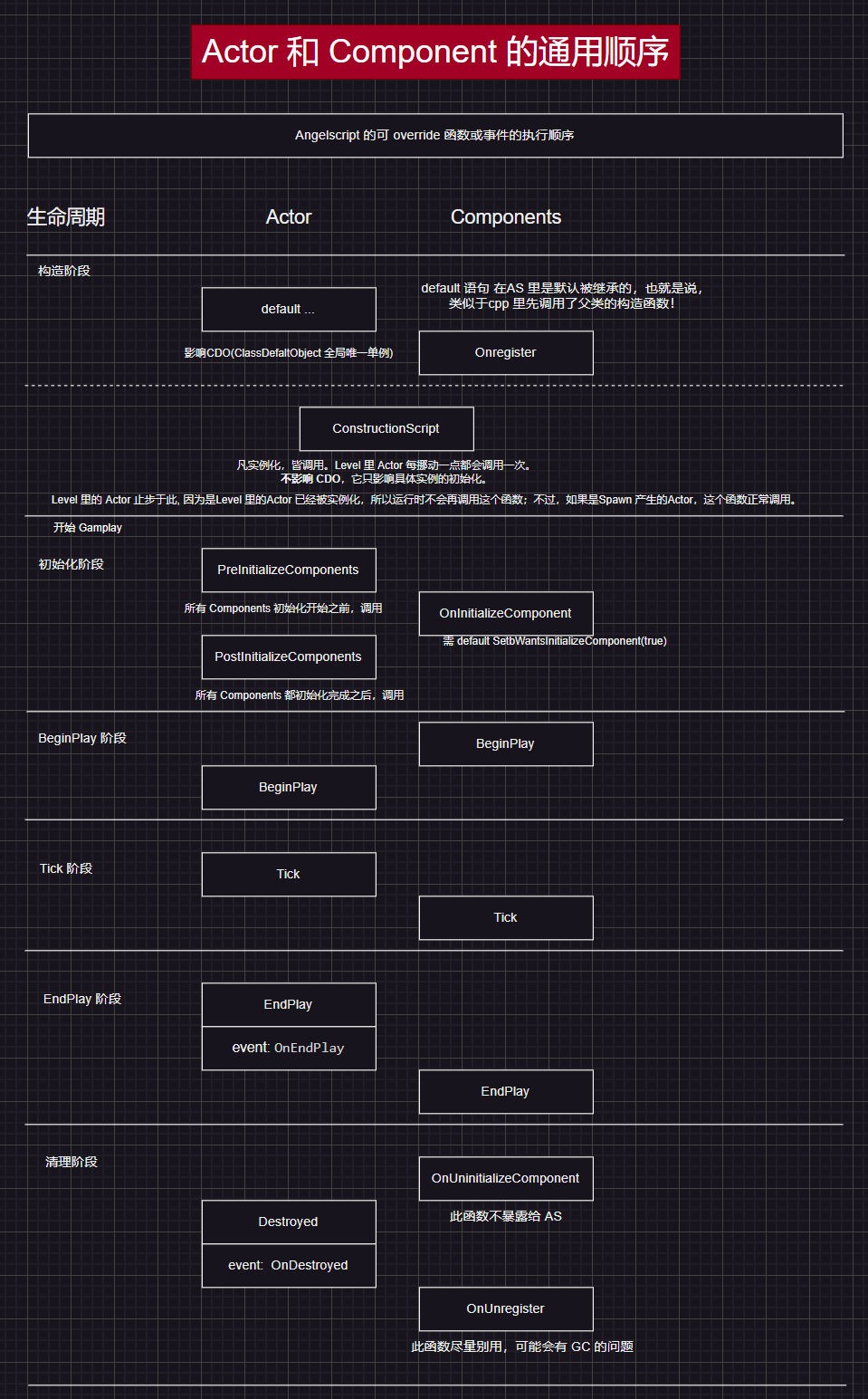
A picture says a thousand words. Here is the default AS lifecycle for an Actor and its components.
Some stages are absent from AS AActor and UActorComponent and need exposing from cpp. I added PreInitializeComponents and PostInitializeComponents to Actor. For components, I added Onregister, OnInitializeComponent, OnUninitializeComponent and OnUnregister.
Except OnUninitializeComponent, I forwarded these to AS through inheritance, using a middle-layer class between the engine and Cpp. For the reasoning, see this series’ project-structure article.
Why draw this diagram? Some of these cpp functions run in a different order in AS. ConstructionScript is Blueprint-specific but exists in AS too. Without sorting out the stages, it is hard to know what runs first.
Need even finer control of component initialization?
Delegates can usually enforce the order.
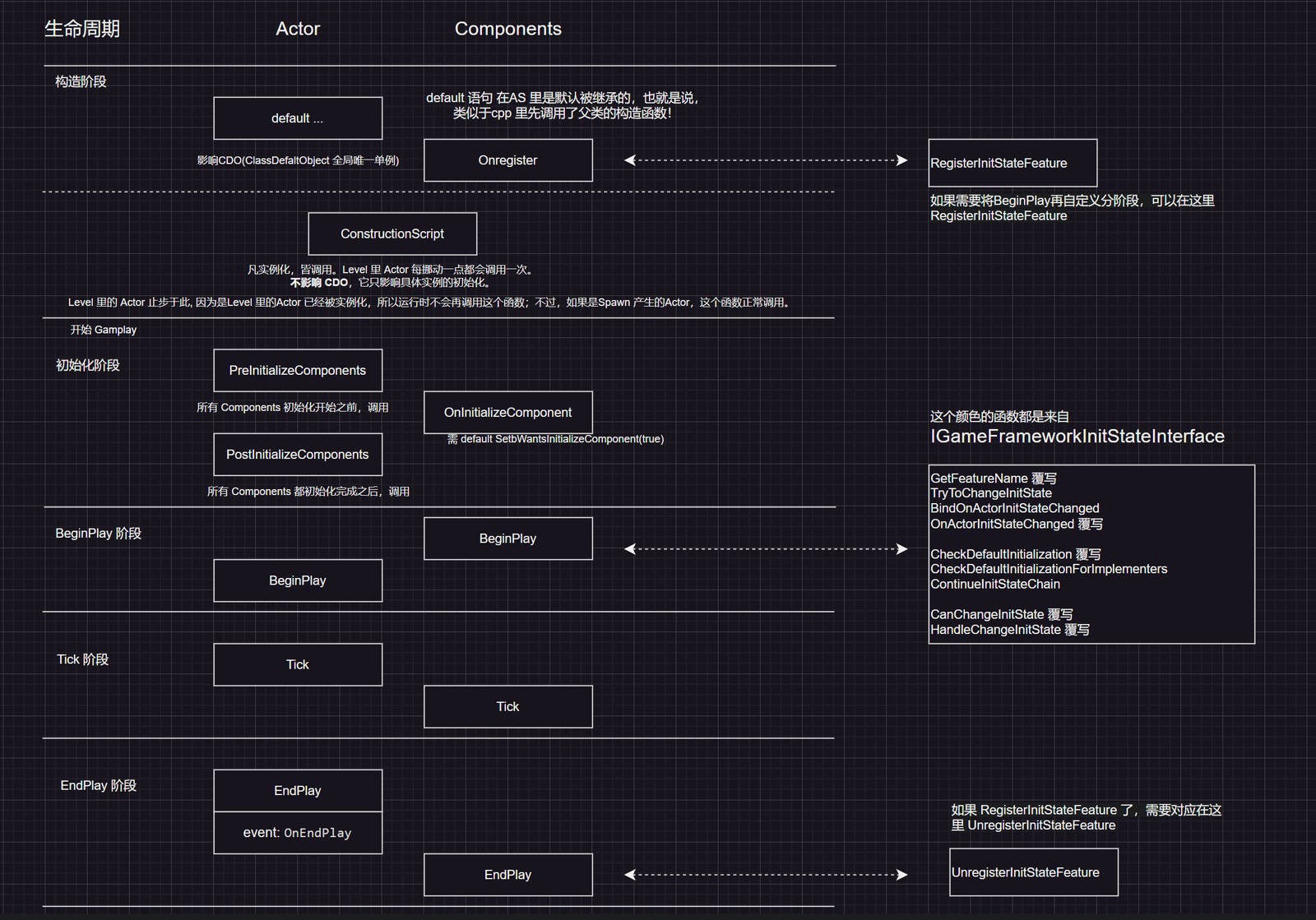
When things get complicated enough, use IGameFrameworkInitStateInterface. It divides BeginPlay into named custom stages, letting components listen to one another’s initialization progress. That provides more control than delegates alone.
Lyra’s ULyraPawnExtensionComponent and ULyraHeroComponent initialization is a classic example. Plenty of people have written about it; search for those.
Combined with the native stages, it looks like this: Register the component with the initialization helper when registering the component itself, and unregister during EndPlay. The crucial BeginPlay stage can be divided into as many named stages as needed. The diagram lists some overridable and callable functions. To use these from AS, apply IGameFrameworkInitStateInterface to the cpp parent, then expose the methods through overrides and bindings.
Attaching components dynamically#
The simplest case is creating a component with New and holding it as an Actor member.
For a real component rather than just a member, it also needs dynamic attachment. Consider the GameFeature approach. If needed, learn the relevant GameFeature usage.
This is closely related to UGameFrameworkComponentManager, a UGameInstanceSubsystem.
More component glue#
The engine’s ModularGameplay module provides UGameFrameworkComponent. Its four GameFrameworkComponent forms are:
- GameStateComponent
- PlayerStateComponent
- PawnComponent
- ControllerComponent
Derive from these to save lots of glue code. One small cost: existing UActorComponent extensions need copying across.
Many helpers are templates and must be specialized to concrete types for binding.
A quick wrap-up#
Actors and components are used constantly in UE, so naturally they deserve a comfortable setup. The steps above should help. If not, do not use them. Leave the complicated pieces aside until needed, especially fine-grained component initialization. That is not easy.
Where are UObject’s components?#
Actors are clearly the chosen ones, with their flexible component system. UObject, the old veteran that supplies all the foundations, has none — precisely because it only provides foundations.
Without components or AS UE interfaces, how do several UObjects share methods? Copy them? Fine for one or two, not N objects.
I asked around and found no ready solution. Here is a proposal which, by reasoning through the logic, should provide a simple UObject component system.
The goals: Do not change UObject source. Do not force inheritance from a particular UObject subclass, losing generality. Keep the syntax convenient and overhead manageable.
It comes down to two classes: a component base like UActorComponent, and a Subsystem managing component-to-Object mappings.
Implementing a component#
Latest update: some of the following is wrong, especially the understanding of Outer. You may need this article: What does Outer mean in UE? (Corrected, with a detailed demonstration)
Here is the header, mainly to convey the idea.
Call UObject components Parts to distinguish them from Actor Components and avoid awkward function names. FObjectkey is used as a Map key, which is more useful than a pointer here.
// ObjectPart.h

/**
 * Don't use NewObject(...) to Create instance for it, * Use UObjectPartSubsystem::Get().AddPart(...) or UObject's mixin function .AddPart(...) */UCLASS(Abstract, Blueprintable)
class My_API UObjectPart : public UObject
{
    GENERATED_BODY()

public:
    // Called by UObjectPartSubsystem only
    void InitializePart(UObjectPartSubsystem* InSubsystem, UObject* InOwner);

    virtual void BeginDestroy() override;

    UFUNCTION(BlueprintCallable)
    UObject* GetOwnerObject() const;

    UFUNCTION(BlueprintCallable, meta=(DeterminesOutputType=ObjectType))
    UObject* GetOwnerObjectByType(const TSubclassOf<UObject> ObjectType) const;

    UFUNCTION(BlueprintCallable)
    UObjectPartSubsystem* GetObjectPartSubsystem() const;

protected:
    TWeakObjectPtr<UObjectPartSubsystem> Subsystem;
    // Use ObjectKey to be the key in the UObjectPartSubsystem's TMap
    FObjectKey OwnerObjectKey;
};
Implementing the component system#
Again, the header mainly conveys the idea.
This system manages components and their Owners. The Owner is the component’s Outer. When Outer is collected, so is the component; collecting a component triggers removal of its mapping from this management system.
FObjectkey avoids the situation where another kind of UE pointer becomes nullptr. What about raw pointers? Possible, but UE discourages them as members. Accidentally access one after it becomes invalid and the engine crashes immediately.
This design does not consider serialization or networking. Add those if your requirements need them.
class My_API UObjectPartSubsystem : public UGameInstanceSubsystem
{
	GENERATED_BODY()

public:
	template <typename T, typename = typename TEnableIf<TIsDerivedFrom<
		          T, UObjectPart>::Value>::Type>
	T* AddPart(UObject* Owner, const TSubclassOf<T> PartClass);

	UFUNCTION(BlueprintCallable, meta=(DeterminesOutputType=PartClass),
		DisplayName="AddPart")
	UObjectPart* AddPart(UObject* Owner,
	                               const TSubclassOf<UObjectPart> PartClass);

	void RemovePart(const FObjectKey OwnerKey, UObjectPart* Part);

	UFUNCTION(BlueprintCallable)
	void BP_RemovePart(const UObject* Owner, UObjectPart* Part)
	{
		RemovePart(Owner, Part);
	};

	void RemovePartByClass(const FObjectKey OwnerKey,
	                            const TSubclassOf<UObjectPart>& PartClass);

	UFUNCTION(BlueprintCallable)
	void BP_RemovePartByClass(const UObject* Owner,
	                               const TSubclassOf<UObjectPart>& PartClass)
	{
		RemovePartByClass(Owner, PartClass);
	};

	// get the first component of the class
	UFUNCTION(BlueprintCallable)
	UObjectPart* GetPartByClass(UObject* Owner,
	                                      const TSubclassOf<UObjectPart>& PartClass);

	UFUNCTION(BlueprintCallable)
	TArray<UObjectPart*> GetPartTArrayByClass(UObject* Owner,
	                                                    const TSubclassOf<UObjectPart>&
	                                                    PartClass);

	UFUNCTION(BlueprintCallable)
	TArray<UObjectPart*> GetAllParts(UObject* Owner);

private:
	TMap<FObjectKey, TArray<TWeakObjectPtr<UObjectPart>>> PartsMap;
};

template <typename T, typename>
T* UObjectPartSubsystem::AddPart(UObject* Owner, const TSubclassOf<T> PartClass)
{
	// use Owner as the Outer, so the lifetime follows it
	T* NewPart = NewObject<T>(Owner, PartClass);
	// let NewPart hold a TWeakObjectPtr to the Owner and to this Subsystem
	NewPart->InitializePart(this, Owner);

	const FObjectKey OwnerKey(Owner);
	PartsMap.FindOrAdd(OwnerKey).Add(NewPart);
	return NewPart;
}Mixin#
After all that, repeatedly writing UObjectPartSubsystem::Get() is still inconvenient and does not feel like calling a component. Use Mixin magic to put the component functions on UObject.
Write the following directly in AS:
mixin UObjectPart AddPart(UObject Owner, const TSubclassOf<UObjectPart> PartClass)
{
	return UObjectPartSubsystem::Get().AddPart(Owner, PartClass);
}

mixin void RemovePart(UObject Owner, UObjectPart Part)
{
	UObjectPartSubsystem::Get().RemovePart(Owner, Part);
};

mixin UObjectPart GetPartByClass(UObject Owner, const TSubclassOf<UObjectPart>& PartClass)
{
	return UObjectPartSubsystem::Get().GetPartByClass(Owner, PartClass);
};

mixin TArray<UObjectPart> GetPartTArrayByClass(UObject Owner, const TSubclassOf<UObjectPart>& PartClass)
{
	return UObjectPartSubsystem::Get().GetPartTArrayByClass(Owner, PartClass);
};

mixin TArray<UObjectPart> GetAllParts(UObject Owner)
{
	return UObjectPartSubsystem::Get().GetAllParts(Owner);
};

mixin bool HasPartByClass(UObject Owner, const TSubclassOf<UObjectPart>& PartClass)
{
	auto Part = Owner.GetPartByClass(PartClass);
	return (Part == nullptr) ? false : true;
}
A quick wrap-up#
UObject now has its own component system. It need not be complex: sharing some methods and data is enough.
Summary#
Components decouple features. UE gives heavyweight Actors a good component system, though much of it is most comfortable in cpp. Some inheritance and binding makes it pleasant in AS too. UObject does not need such a complex system, but the absence of AS interfaces makes sharing behavior difficult. This article offers an idea. Corrections are welcome.